If plasma TVs can be so thin, why have we spent decades with those bulky, oversized television sets taking up an entire corner of the room? The answer is in the technology.
To understand why plasma TVs can be so thin, you should start by understanding why traditional television sets of the past couldn't be. Those televisions typically used tubes as the means to producing the pictures. There were several problems with tubes, including their size. The size of tubes inside a television set depended on the amount of screen space the picture was expected to fill.
The technology wasn't put to the "size test" until people became disenchanted with the typical 20-inch screen and started demanding larger screens. Manufacturers were happy to meet the demands, but there was a problem. The dimensions of tubes are predetermined. If you want a bigger screen, you have to be prepared to project a larger picture. Larger picture demands a larger tube. It's always been a given that the size of the television set was dependent on the amount of "stuff" that had to be fitted inside. Larger tubes meant larger cases.
If you consider the average size of a 20-inch television set that used tube technology, you can imagine how big the case would have to be in order to project a picture for a 32-inch, 40-inch or larger screen.
By contrast, a plasma TV doesn't need the tubes in order to project the picture. Plasma TV, by its very technology, can be housed in a very thin case. Instead of having tubes that project a picture onto that big screen, the plasma TV works by lighting up the phosphorous coating at various times to create the images prescribed by the signal.
The result is that plasma TV screens require very little space other than the room for the screen and the phosphorous. In fact, the entire packages are actually thin enough that they can be mounted - creating a viewing experience only to be imagined with the tube-type television technology. It also means that the thickness of the screen can remain virtually constant, even while the width and height of the screen increases dramatically.
When you consider where the technology is, and where it's come from, you'll see that the huge television sets of a decade ago weren't merely a fad. Those cases weren't created that large simply to provide a shelf for mom's favorite flower arrangement or the wedding photo. It was just a matter of providing a case for the technology.
Showing posts with label Digital Product. Show all posts
Showing posts with label Digital Product. Show all posts

Fujifilm FinePix A303 Digital Camera
Two years ago I purchased my first digital camera. At that time, prices for a 3.0 and higher mega pixel camera were around $350. Since then, as with all electronic gadgets, prices have dropped significantly while the mega pixels have gone up. I chose the Fujifilm's A303 digital camera, which has fared well for me, so permit me the opportunity to tell you why.
I desperately needed a digital camera when my web business took off. On many different occasions I found myself wanting to take a picture of a person, place or thing and having to rely on a 35mm camera. Trouble was I wasn't very good at taking pictures. Usually my subject came out blurry or the picture needed cropping. Yes, getting pictures developed on disk would have resolved the latter problem, but it was the former problem -- blurry pictures -- that was causing me the most grief. If only I could see "on the spot" how my picture turned out. If it turned out poorly, I could reshoot. Naturally, a digital camera presented to me something that no 35mm camera could offer; I made the purchase of a 3.2 mega pixel camera by Fujifilm after considerable shopping around and reading product reviews online.
Packed within a tough grey shell, the A303 is lightweight and can fit easily into your pant pockets. The camera's controls are simple to figure out and include a Menu/OK button, Back button, viewfinder, viewfinder lamp, a display buttion and LCD monitor to preview pictures without looking through the viewfinder or to review pictures already taken. A round dial in the back of the camera features a self timer mode where you can set the camera and ten seconds later have the picture go off. Great for when you want to get the entire family's picture and no one is around to take it. There are also close up modes, still image, playback and movie modes. The movie mode results in a fairly choppy and short film, but it is a neat feature to have nevertheless
The standard camera comes equipped with a 16mb picture card. Most people will find that inadequate, so I paid a little bit extra and bought the 64mb upgrade. I also purchased rechargeable AA batteries -- it takes two -- and a recharger. You will sap your batteries quickly if you take 30-40 or more pictures at a time, so the recharger makes sense. I purchased the accompanying Fujifilm carrying case to house my other supplies.
Pictures come out clear and in two years of picture taking I have not experienced a single problem with the camera. At 3.2 mega pixels the pictures are more than adequate as virtually everything I do gets posted to the internet. Supposedly you do not need more mega pixels when posting/viewing pictures online. With the included USB cable and HP software, you will be uploading pictures to the internet in no time.
If there are any drawbacks with the A303 there is just one and it is a glaring problem: the time between shots can seem endless! I suppose the elapsed time is only about ten seconds, but it seems like an eternity especially compared to 35mm cameras. Technological improvements have closed the gap considerably with newer models, but if you need this camera to take a group of shots quickly you will be disappointed.
All in all, the A303 is a very good camera. I give it a 4-star rating for ease of use, price, and dependability.
I desperately needed a digital camera when my web business took off. On many different occasions I found myself wanting to take a picture of a person, place or thing and having to rely on a 35mm camera. Trouble was I wasn't very good at taking pictures. Usually my subject came out blurry or the picture needed cropping. Yes, getting pictures developed on disk would have resolved the latter problem, but it was the former problem -- blurry pictures -- that was causing me the most grief. If only I could see "on the spot" how my picture turned out. If it turned out poorly, I could reshoot. Naturally, a digital camera presented to me something that no 35mm camera could offer; I made the purchase of a 3.2 mega pixel camera by Fujifilm after considerable shopping around and reading product reviews online.
Packed within a tough grey shell, the A303 is lightweight and can fit easily into your pant pockets. The camera's controls are simple to figure out and include a Menu/OK button, Back button, viewfinder, viewfinder lamp, a display buttion and LCD monitor to preview pictures without looking through the viewfinder or to review pictures already taken. A round dial in the back of the camera features a self timer mode where you can set the camera and ten seconds later have the picture go off. Great for when you want to get the entire family's picture and no one is around to take it. There are also close up modes, still image, playback and movie modes. The movie mode results in a fairly choppy and short film, but it is a neat feature to have nevertheless
The standard camera comes equipped with a 16mb picture card. Most people will find that inadequate, so I paid a little bit extra and bought the 64mb upgrade. I also purchased rechargeable AA batteries -- it takes two -- and a recharger. You will sap your batteries quickly if you take 30-40 or more pictures at a time, so the recharger makes sense. I purchased the accompanying Fujifilm carrying case to house my other supplies.
Pictures come out clear and in two years of picture taking I have not experienced a single problem with the camera. At 3.2 mega pixels the pictures are more than adequate as virtually everything I do gets posted to the internet. Supposedly you do not need more mega pixels when posting/viewing pictures online. With the included USB cable and HP software, you will be uploading pictures to the internet in no time.
If there are any drawbacks with the A303 there is just one and it is a glaring problem: the time between shots can seem endless! I suppose the elapsed time is only about ten seconds, but it seems like an eternity especially compared to 35mm cameras. Technological improvements have closed the gap considerably with newer models, but if you need this camera to take a group of shots quickly you will be disappointed.
All in all, the A303 is a very good camera. I give it a 4-star rating for ease of use, price, and dependability.
Zune Marketplace Store - Comparing Best Sites For Unlimited Zune Downloads
Are you looking for the best websites for downloading games, movies, music, etc to your new Microsoft Zune player ? Do you also want to compare them based on various factors like their popularity, price, quality of service, collection of movies and games, satisfaction guarantee, etc. Then you have come to the right place! This article gives 6 tips which should be considered before subscribing on any website on the internet providing unlimited downloads for your zune player.
1. Availability of Files - After you arrive to any zune downloads website, the first thing that you should look for is - what is the collection of movies, games, music, etc. this site provides. If the collection is not much, you should definitely avoid it. Because most of the zune downloads site on the internet offers life time membership for which you pay only once. You should not compromise with a website having low collection just for saving a few bucks.
2 Money Back Guarantee - This is the second important thing which should be considered before joining the service. The site where you want to subscribe should offer atleast 60 days money back guarantee. Once you are not happy with the service, you can get your money back and try the other one.
3. Price - Now you should look how much price is charged at this zune downloads service provider. You can subscribe to the site offering reasonable fee, considering the above two factors in mind. There are some websites on the internet which offers as cheap as 34.95$ for lifetime membership.
4. Convenience and User Interface - The user interface provided by the website should be simple and easy to use. You should be able to easily manage the downloads of your favorite movies, games, music, etc.
5. Download Speed - The download speed must be fast, otherwise no matter how large the collection is, you can not get them transferred on your Zune in your life. Slow downloading speed is very irritating. There are websites which provides great downloading speed for your Zune. Most of the time, the download is instantaneous. Also you should be able to start watching a movie when its download is in progress.
6. Customer Support - The ideal website would be the one where you will not need to contact their customer support. In case there is any minor problem, they should immediately respond to you. Otherwise you should definitely go for option number 3 as soon as possible.
1. Availability of Files - After you arrive to any zune downloads website, the first thing that you should look for is - what is the collection of movies, games, music, etc. this site provides. If the collection is not much, you should definitely avoid it. Because most of the zune downloads site on the internet offers life time membership for which you pay only once. You should not compromise with a website having low collection just for saving a few bucks.
2 Money Back Guarantee - This is the second important thing which should be considered before joining the service. The site where you want to subscribe should offer atleast 60 days money back guarantee. Once you are not happy with the service, you can get your money back and try the other one.
3. Price - Now you should look how much price is charged at this zune downloads service provider. You can subscribe to the site offering reasonable fee, considering the above two factors in mind. There are some websites on the internet which offers as cheap as 34.95$ for lifetime membership.
4. Convenience and User Interface - The user interface provided by the website should be simple and easy to use. You should be able to easily manage the downloads of your favorite movies, games, music, etc.
5. Download Speed - The download speed must be fast, otherwise no matter how large the collection is, you can not get them transferred on your Zune in your life. Slow downloading speed is very irritating. There are websites which provides great downloading speed for your Zune. Most of the time, the download is instantaneous. Also you should be able to start watching a movie when its download is in progress.
6. Customer Support - The ideal website would be the one where you will not need to contact their customer support. In case there is any minor problem, they should immediately respond to you. Otherwise you should definitely go for option number 3 as soon as possible.
Buyers Guide to Home Theater Projectors

There are two main types of projectors on the market; DLP and LCD. DLP stands for digital light processing. It was invented by Texas Instruments, and utilizes a microscopic array of over 2 million mirrors. DLP has a higher contrast than LCD, but there are some unfavorable consumer reports that note something called the "rainbow effect". The "rainbow effect" is noticeable when looking from one side of the screen to the other, and is characterized by a sudden burst of color.
LCD stands for liquid crystal display. These projectors have three distinct glass LCD panels inside; one for each component of the video signal (red, green, and blue). While DLP chips reflect light, the LCD panels allow light to pass through them. LCD projectors produce brighter images, and they are known for having excellent color saturation. In the end, you will be hard-pressed to notice a great difference between the two types of projection systems
When shopping for a new projector, keep your particular needs in the forefront of your thoughts. As I mentioned above, it is really easy to lose yourself in the minutiae of each particular system. Connectivity is a definitely something to be mindful of. Make sure that you are able to connect all of your components, including your gaming system. Nothing beats playing Halo in real-life size! Contract ratio is another important factor; the higher the ratio, the better the picture will be.
The brightness of your projector is another thing to consider. Light output is measured in ANSI (American National Standards Institute) lumens. You will want to avoid a projector that produces anything shy of 1000 lumens. As you are likely aware, the projection resolution is extremely important. This refers to the number of pixels that can be displayed on the screen. Go for something that is no less than 1024x768, as this will allow you to fully appreciate the depth and quality of HDTV. In the end, you should buy the projector that is in line with your needs and your budget. Soprano's is coming on right now! Time to go!
ViewSonic Plasma Consumer Reviews of the VPW4200 42 inch EDTV-ready Television

Important Aspects of the VPW4200
This model has a 852x480 pixel resolution and brightness level of 1000 cd/m2. These specifications show the consumer that the ViewSonic VPW4200 plasma TV will produce a wonderful picture to aid in your viewing pleasure. Another important aspect of the VPW4200 is the large quantity of input/output capabilities that this plasma TV has. Composite video input and output features are present as well as audio input and output jacks. This allows for the VPW4200 to work alongside other electronics in the home.
The pros of this brand of plasma television include brilliant picture and clear sound. As for the cons of the VPW4200 ViewSonic plasma consumer reviews have yet to cite any particular ones. The approximate price range for this specific ViewSonic plasma TV is around $2,000.
When looking at the price and beneficial aspects of the ViewSonic VPW4200 plasma TV, few would think twice about purchasing this particular make and model. If the components are what you are looking for in a plasma TV purchase, then the VPW4200 just might be the perfect plasma television for you and your family.
LCD TV UK

Here's an example of how versatile a UK LCD TV with a TV tuner can be: you combine video from a PS2, an Xbox 360, cable TV, a DVD player, and the PC – all into one LCD monitor. You can watch TV with picture-in-picture mode while you work on your computer, then with a touch of a button switch over to playing an Xbox or PS2 game. Finished with the game? Toggle back to the TV feed or to your computer.
Here's an important consideration: many standard LCD monitors will accept television feeds through appropriate cabling, but you'll need a cable box or cable converter to decode digital-TV signals. A UK LCD TV with a TV tuner overcomes that hurdle. Space limitations (for instance, determining where you have room to put the cable box) is a good reason to have the tuner built into the television. Also, if the tuner is built into the monitor, you'll only need one remote control.
Keep in mind that an LCD TV UK with a TV tuner built in will cost approximately 20 percent more than a monitor without a TV tuner.
Here are some examples of some models of LCD TV UK you can purchase that come complete with TV tuners:
1. Sony TV Tuner/Monitor MFM-HT75W – UK version: A flat panel LCD monitor with a 17" widescreen display, this model offers Digital S-video inputs, is HDTV capable, and has a remote control.
2. Sony TV Tuner/Monitor MFM-HT95 – UK version: A flat panel LCD monitor with a 19" widescreen display, it is HDTV capable, has Digital S-video inputs, an SXGA display, and a remote control. Average retail price is approximately $720.
3. Philips 17PF8946 17" Widescreen HD-Ready Flat-Panel LCD TV UK with PC Input: A flat panel LCD with a built-in tuner, it also has a built-in FM tuner and built-in speakers.
4. Magnavox 15MF605T/1 15" HD-Ready UK LCD TV with HD Component Video and PC Inputs: A flat LCD panel with a built-in tuner, the small size of this monitor makes it a great fit for tight spaces. It allows picture-in-picture viewing along with built-in speakers, and even comes with a V-chip for parental viewing controls.
Where can you find an LCD TV in the UK? Major retailers like Curry's and Richer Sounds carry a large selection LCD TVs in the UK. You can also try online electronics retailers, and frequently can find great deals at online auction sites like ebay.co.uk.
75 percent of people buy the wrong digital camera
When I teach a new class learning digital photography, over 75% of the students turn up with the camera the salesman suggested.
Guess what? They soon find out that it's the wrong one for them. This can be a very expensive mistake. So the big questions are what is the right one for me and how do I know which is best for me.
One of the first things that you want to know about the camera that the salesman is trying to sell you is as follows - How long does the camera take to turn on and be ready to take the shot? In the consumer market this can range between 1 to 5 seconds most being towards the 3 seconds mark. How long does the camera take to focus on the subject? (Not to take the picture) most cameras take between 1 to 3 seconds most at around the 1-second mark. How long does the camera take to actually take the photo after you have pushed the shutter button completely? Again, most cameras take between 1to 3 seconds this is called shutter lag time. Now you can see to take a photo can take up to 5 seconds just to turn on and up to another 3 seconds to focus in and the up to another 3 seconds just to actually take the photo.
In a cheaper camera, but not necessarily cheaper it can be up to 9 seconds to take a photo from the camera turned off. You may say "yes but I will leave my camera on" ok that's fine, but you may still have a lag time of up to 3 seconds just to take a photo. Just imagine how annoying it will be now that you have purchased your new digital camera costing you around $400 - $500 to find that you just can't catch your child blowing out the candles because your new camera at the critical time of blowing the candles out took 1 second to focus and a further 2 seconds to take the photo. What was the result? A child sitting in front of a cake with black smoldering candles.
Can you set the white balance on your camera? Just what is the white balance?
About 60% of digital cameras don't have this adjustment, you must buy one that can be set manually, not just one that has an "auto white balance" as they are not as good as they advertise.
Does your camera have different exposure modes?
Exposure modes are simply where does the camera take a light reading? The cheaper cameras just do an all over reading which can be very limiting to say the least. A good camera will have a "spot", "centre weighted" and "matrix" metering system, which allows you to take great photos in any light situation.
When buying a digital camera, buy it for the fact that it's a camera not a video camera as well. One student showed me all the features her camera had and that's why it was more expensive – the only thing that it didn't do well was take still pictures!
You can get so much out of your new digital camera! you just have to put some time in for learning how to use it properly and how to take better pictures – remember no one will ever want to look at a poor quality photo twice!
If you want to take really great pictures that will be in your family for years put in a little effort with your new digital camera.
Guess what? They soon find out that it's the wrong one for them. This can be a very expensive mistake. So the big questions are what is the right one for me and how do I know which is best for me.
One of the first things that you want to know about the camera that the salesman is trying to sell you is as follows - How long does the camera take to turn on and be ready to take the shot? In the consumer market this can range between 1 to 5 seconds most being towards the 3 seconds mark. How long does the camera take to focus on the subject? (Not to take the picture) most cameras take between 1 to 3 seconds most at around the 1-second mark. How long does the camera take to actually take the photo after you have pushed the shutter button completely? Again, most cameras take between 1to 3 seconds this is called shutter lag time. Now you can see to take a photo can take up to 5 seconds just to turn on and up to another 3 seconds to focus in and the up to another 3 seconds just to actually take the photo.
In a cheaper camera, but not necessarily cheaper it can be up to 9 seconds to take a photo from the camera turned off. You may say "yes but I will leave my camera on" ok that's fine, but you may still have a lag time of up to 3 seconds just to take a photo. Just imagine how annoying it will be now that you have purchased your new digital camera costing you around $400 - $500 to find that you just can't catch your child blowing out the candles because your new camera at the critical time of blowing the candles out took 1 second to focus and a further 2 seconds to take the photo. What was the result? A child sitting in front of a cake with black smoldering candles.
Can you set the white balance on your camera? Just what is the white balance?
About 60% of digital cameras don't have this adjustment, you must buy one that can be set manually, not just one that has an "auto white balance" as they are not as good as they advertise.
Does your camera have different exposure modes?
Exposure modes are simply where does the camera take a light reading? The cheaper cameras just do an all over reading which can be very limiting to say the least. A good camera will have a "spot", "centre weighted" and "matrix" metering system, which allows you to take great photos in any light situation.
When buying a digital camera, buy it for the fact that it's a camera not a video camera as well. One student showed me all the features her camera had and that's why it was more expensive – the only thing that it didn't do well was take still pictures!
You can get so much out of your new digital camera! you just have to put some time in for learning how to use it properly and how to take better pictures – remember no one will ever want to look at a poor quality photo twice!
If you want to take really great pictures that will be in your family for years put in a little effort with your new digital camera.
Rss To Blog Pro - A 6-Month Review
Background
Search engines are particularly interested in websites with constantly updated, relevant content. Websites that appear static without a supply of fresh content may be viewed as dormant and in their drive to provide the latest, most relevant search results to users, search engines may rank such a website lower than a website that is updated regularly.
What Is It?
RSS to Blog Pro is a fully automated blog posting tool offering self-updating websites. It's a PHP script that is installed on a single web hosting account. From this centralised installation, multiple blogs can be maintained with fresh content from various sources. Also available is an earlier, non-pro version, which has the same basic functionality, but requires a separate install for each blog it maintains.
What Problem Does It Solve?
Adding fresh - and importantly, relevant - content to websites can be a resource consuming task. Either you spend time finding and creating new content or you pay someone to do it for you. Without fresh content, your websites can appear stagnant and drop off the search engines radar. This impacts your website rankings in search results and ultimately has a detrimental effect on any free traffic coming from the search engines. If your websites rely on search engine traffic then this can mean their downfall.
What Are The Benefits?
RSS to Blog Pro tackles the problem of needing to regularly update website content by automating the whole process from finding relevant content based upon keywords that you provide through to posting content to your website blog. In the eyes of search engines, updating a website with irrelevant content isn't nearly as good as having relevant content. The tighter your niche, the better chances you have of ranking higher as you'll be competing with a smaller number of websites. Using a scattergun approach to website content can mean you end up competing with websites across a large number of niches.
If you're building content websites with the aim of earning an AdSense income then you'll know that the ads shown are dependant upon the surrounding content on your webpages. Irrelevant content results in ads that are irrelevant to your website visitors, which means they'll have no interest in clicking on them and your generated income will be poor.
Features
* Supports multiple blog types including WordPress, Blogger Blogs, Movable Type, Type Pad, Live Journal and MSN Spaces.
* Keywords and RSS feeds can be specified for automatic content generation or you can supply your own content.
* Posting to your blogs can be scheduled at random intervals e.g. once or twice a day so that posting appears natural.
* There are no 'footprints' to identify the content as being automatically generated.
* Log records are kept so you can see exactly what has been posted and to where.
* Built-in ping functionality for blog and ping.
* A single installation will post to an unlimited number of blogs.
* Regular updates.
* User support forum.
* Two tier affiliate programme offering 40% commission to the top level and 10% for any sales from affiliates you recruit.
My Experience With RSS to Blog Pro
Since August 2005, I've been using RSS to Blog Pro on an increasing number of blogs in various niches. I'm pleased to be able to say that my income from AdSense has increased month upon month since then. With the software installed on my virtual private server (VPS), I currently manage around 50 blogs, posting relevant new content every day or two. I'd recommend that you don't install RSS to Blog Pro onto a shared server because if you're updating a large number of websites or you're running the script frequently (every couple of minutes) then your host is likely to take a dim view on it. Considering how inexpensive and how much more reliable a VPS is to operate there just isn't any reasonable justification for risking a shared server. A VPS is like having your own server, completely isolated from any other peoples websites so you can't affect them and they can't affect you. There is the exception of disk IO, but that isn't something that should be of any real concern.
The issue of relevancy is really what makes the difference between an effective auto content generation tool and one that will never do anything for your bottom line. I can't stress it enough; without relevant content, search engines won't be able to categorise your niche and won't be able to rank you fairly amongst your peers. That means you won't do well in searches in your subject area. It also could mean your website will serve ads for tennis equipment when your niche is dog care. Visitors looking for information about dog care are highly unlikely to be interested in tennis equipment when they come to your website because it's not something which is relevant to their needs at that time.
There's no doubt that this helps to keep those websites looking fresh and my website stats show a constant stream of visits to my blog pages each month. And of course, lots of targetted visitors and lots of targetted content means a lot of clicks on targetted ads!
Support-wise, Michelle (creator of RSS to Blog Pro) has answered my email queries promptly and there's an active user forum for peer support. Michelle also visits the forum to provide assistance although some queries can take a couple of days for a response, however the user base, support forum and software is mature enough to be able to cope with almost every common question a new user might have.
Fortunately, the software is easy to install and set-up so you can expect to be running within an hour or two.
One feature that I haven't used is the ability to ping blog directories from within RSS to Blog Pro. The reason for this is that if I pinged these websites for every post made to each of my blogs then I'd actually end up pinging up to 50 times a day from the same domain (the domain on which RSS to Blog Pro is installed). Rather than risk being blacklisted for pinging too much and hogging the resources of the directories, I use the ping facility from with my WordPress blog software instead so that the individual pings come from the individual domains. Again, this will appear to be a lot more natural and it also helps RSS to Blog Pro to work more efficiently by decoupling some of the work away from it.
Conclusion
After 6 months of constant usage, I'm pretty happy with RSS to Blog Pro's performance. and would definitely recommend it to anyone who is wanting to have self-updating websites that attract targetted traffic. Care needs to be taken when selecting a host for the script, but once installed, operation of the script is simple and reliable. An excellent script in the toolbox of AdSense earners and affiliate marketers alike.
Search engines are particularly interested in websites with constantly updated, relevant content. Websites that appear static without a supply of fresh content may be viewed as dormant and in their drive to provide the latest, most relevant search results to users, search engines may rank such a website lower than a website that is updated regularly.
What Is It?
RSS to Blog Pro is a fully automated blog posting tool offering self-updating websites. It's a PHP script that is installed on a single web hosting account. From this centralised installation, multiple blogs can be maintained with fresh content from various sources. Also available is an earlier, non-pro version, which has the same basic functionality, but requires a separate install for each blog it maintains.
What Problem Does It Solve?
Adding fresh - and importantly, relevant - content to websites can be a resource consuming task. Either you spend time finding and creating new content or you pay someone to do it for you. Without fresh content, your websites can appear stagnant and drop off the search engines radar. This impacts your website rankings in search results and ultimately has a detrimental effect on any free traffic coming from the search engines. If your websites rely on search engine traffic then this can mean their downfall.
What Are The Benefits?
RSS to Blog Pro tackles the problem of needing to regularly update website content by automating the whole process from finding relevant content based upon keywords that you provide through to posting content to your website blog. In the eyes of search engines, updating a website with irrelevant content isn't nearly as good as having relevant content. The tighter your niche, the better chances you have of ranking higher as you'll be competing with a smaller number of websites. Using a scattergun approach to website content can mean you end up competing with websites across a large number of niches.
If you're building content websites with the aim of earning an AdSense income then you'll know that the ads shown are dependant upon the surrounding content on your webpages. Irrelevant content results in ads that are irrelevant to your website visitors, which means they'll have no interest in clicking on them and your generated income will be poor.
Features
* Supports multiple blog types including WordPress, Blogger Blogs, Movable Type, Type Pad, Live Journal and MSN Spaces.
* Keywords and RSS feeds can be specified for automatic content generation or you can supply your own content.
* Posting to your blogs can be scheduled at random intervals e.g. once or twice a day so that posting appears natural.
* There are no 'footprints' to identify the content as being automatically generated.
* Log records are kept so you can see exactly what has been posted and to where.
* Built-in ping functionality for blog and ping.
* A single installation will post to an unlimited number of blogs.
* Regular updates.
* User support forum.
* Two tier affiliate programme offering 40% commission to the top level and 10% for any sales from affiliates you recruit.
My Experience With RSS to Blog Pro
Since August 2005, I've been using RSS to Blog Pro on an increasing number of blogs in various niches. I'm pleased to be able to say that my income from AdSense has increased month upon month since then. With the software installed on my virtual private server (VPS), I currently manage around 50 blogs, posting relevant new content every day or two. I'd recommend that you don't install RSS to Blog Pro onto a shared server because if you're updating a large number of websites or you're running the script frequently (every couple of minutes) then your host is likely to take a dim view on it. Considering how inexpensive and how much more reliable a VPS is to operate there just isn't any reasonable justification for risking a shared server. A VPS is like having your own server, completely isolated from any other peoples websites so you can't affect them and they can't affect you. There is the exception of disk IO, but that isn't something that should be of any real concern.
The issue of relevancy is really what makes the difference between an effective auto content generation tool and one that will never do anything for your bottom line. I can't stress it enough; without relevant content, search engines won't be able to categorise your niche and won't be able to rank you fairly amongst your peers. That means you won't do well in searches in your subject area. It also could mean your website will serve ads for tennis equipment when your niche is dog care. Visitors looking for information about dog care are highly unlikely to be interested in tennis equipment when they come to your website because it's not something which is relevant to their needs at that time.
There's no doubt that this helps to keep those websites looking fresh and my website stats show a constant stream of visits to my blog pages each month. And of course, lots of targetted visitors and lots of targetted content means a lot of clicks on targetted ads!
Support-wise, Michelle (creator of RSS to Blog Pro) has answered my email queries promptly and there's an active user forum for peer support. Michelle also visits the forum to provide assistance although some queries can take a couple of days for a response, however the user base, support forum and software is mature enough to be able to cope with almost every common question a new user might have.
Fortunately, the software is easy to install and set-up so you can expect to be running within an hour or two.
One feature that I haven't used is the ability to ping blog directories from within RSS to Blog Pro. The reason for this is that if I pinged these websites for every post made to each of my blogs then I'd actually end up pinging up to 50 times a day from the same domain (the domain on which RSS to Blog Pro is installed). Rather than risk being blacklisted for pinging too much and hogging the resources of the directories, I use the ping facility from with my WordPress blog software instead so that the individual pings come from the individual domains. Again, this will appear to be a lot more natural and it also helps RSS to Blog Pro to work more efficiently by decoupling some of the work away from it.
Conclusion
After 6 months of constant usage, I'm pretty happy with RSS to Blog Pro's performance. and would definitely recommend it to anyone who is wanting to have self-updating websites that attract targetted traffic. Care needs to be taken when selecting a host for the script, but once installed, operation of the script is simple and reliable. An excellent script in the toolbox of AdSense earners and affiliate marketers alike.
LCD TV UK
As recently as just a few years ago, consumers needed a different monitor or screen for watching movies, for playing video games, or for watching television and for computing. That's no longer the case. An LCD TV in the UK with a TV tuner allows you to enjoy virtually all your entertainment and audio-visual devices from one location, saving you space and money. If you live in university housing or a small flat, or if you just want to save space, an LCD TV in the UK with a built-in TV tuner is a simple way to accomplish all those goals.
Here's an example of how versatile a UK LCD TV with a TV tuner can be: you combine video from a PS2, an Xbox 360, cable TV, a DVD player, and the PC – all into one LCD monitor. You can watch TV with picture-in-picture mode while you work on your computer, then with a touch of a button switch over to playing an Xbox or PS2 game. Finished with the game? Toggle back to the TV feed or to your computer.
Here's an important consideration: many standard LCD monitors will accept television feeds through appropriate cabling, but you'll need a cable box or cable converter to decode digital-TV signals. A UK LCD TV with a TV tuner overcomes that hurdle. Space limitations (for instance, determining where you have room to put the cable box) is a good reason to have the tuner built into the television. Also, if the tuner is built into the monitor, you'll only need one remote control.
Keep in mind that an LCD TV UK with a TV tuner built in will cost approximately 20 percent more than a monitor without a TV tuner.
Here are some examples of some models of LCD TV UK you can purchase that come complete with TV tuners:
1. Sony TV Tuner/Monitor MFM-HT75W – UK version: A flat panel LCD monitor with a 17" widescreen display, this model offers Digital S-video inputs, is HDTV capable, and has a remote control.
2. Sony TV Tuner/Monitor MFM-HT95 – UK version: A flat panel LCD monitor with a 19" widescreen display, it is HDTV capable, has Digital S-video inputs, an SXGA display, and a remote control. Average retail price is approximately $720.
3. Philips 17PF8946 17" Widescreen HD-Ready Flat-Panel LCD TV UK with PC Input: A flat panel LCD with a built-in tuner, it also has a built-in FM tuner and built-in speakers.
4. Magnavox 15MF605T/1 15" HD-Ready UK LCD TV with HD Component Video and PC Inputs: A flat LCD panel with a built-in tuner, the small size of this monitor makes it a great fit for tight spaces. It allows picture-in-picture viewing along with built-in speakers, and even comes with a V-chip for parental viewing controls.
Where can you find an LCD TV in the UK? Major retailers like Curry's and Richer Sounds carry a large selection LCD TVs in the UK. You can also try online electronics retailers, and frequently can find great deals at online auction sites like ebay.co.uk.
Here's an example of how versatile a UK LCD TV with a TV tuner can be: you combine video from a PS2, an Xbox 360, cable TV, a DVD player, and the PC – all into one LCD monitor. You can watch TV with picture-in-picture mode while you work on your computer, then with a touch of a button switch over to playing an Xbox or PS2 game. Finished with the game? Toggle back to the TV feed or to your computer.
Here's an important consideration: many standard LCD monitors will accept television feeds through appropriate cabling, but you'll need a cable box or cable converter to decode digital-TV signals. A UK LCD TV with a TV tuner overcomes that hurdle. Space limitations (for instance, determining where you have room to put the cable box) is a good reason to have the tuner built into the television. Also, if the tuner is built into the monitor, you'll only need one remote control.
Keep in mind that an LCD TV UK with a TV tuner built in will cost approximately 20 percent more than a monitor without a TV tuner.
Here are some examples of some models of LCD TV UK you can purchase that come complete with TV tuners:
1. Sony TV Tuner/Monitor MFM-HT75W – UK version: A flat panel LCD monitor with a 17" widescreen display, this model offers Digital S-video inputs, is HDTV capable, and has a remote control.
2. Sony TV Tuner/Monitor MFM-HT95 – UK version: A flat panel LCD monitor with a 19" widescreen display, it is HDTV capable, has Digital S-video inputs, an SXGA display, and a remote control. Average retail price is approximately $720.
3. Philips 17PF8946 17" Widescreen HD-Ready Flat-Panel LCD TV UK with PC Input: A flat panel LCD with a built-in tuner, it also has a built-in FM tuner and built-in speakers.
4. Magnavox 15MF605T/1 15" HD-Ready UK LCD TV with HD Component Video and PC Inputs: A flat LCD panel with a built-in tuner, the small size of this monitor makes it a great fit for tight spaces. It allows picture-in-picture viewing along with built-in speakers, and even comes with a V-chip for parental viewing controls.
Where can you find an LCD TV in the UK? Major retailers like Curry's and Richer Sounds carry a large selection LCD TVs in the UK. You can also try online electronics retailers, and frequently can find great deals at online auction sites like ebay.co.uk.
Finding The Right 27" LCD TV
A 27" LCD TV provides a much better picture than the old CRT televisions – and they come in much more attractive styles. In many homes an LCD TV has become an integral feature in the entertainment room's decorating scheme. They're versatile, too. A flat screen 27" LCD TV can be mounted on a wall, under a cabinet, on the ceiling, or it can sit on a stand or on top of furniture. A 27" LCD TV comes in a size that is big enough to comfortably watch from a reasonable distance, but it's also small enough to fit in even the smallest viewing rooms.
The 27" LCD market is also highly competitive – almost every television manufacturer makes at least one 27" model. Choosing the right model for your needs can be time-consuming; to get you started, take these steps as you search for the right TV for you.
First consider your room's décor, and think about how you'll sit relative to the TV. Because a 27" LCD TV has significantly higher resolution than a conventional TV, you'll be able to sit closer than you normally would and view a larger screen much more comfortably. The optimum viewing distance for a 27" LCD TV is approximately 6 feet, so plan your furniture arrangement accordingly.
Then make a decision about whether you want or need HDTV. A 27" LCD TV with EDTV is less expensive to purchase but it won't display high-definition signals. The price difference between a smaller HD-ready 27" LCD TV and an ED-ready 27" LCD TV is relatively small, so you're better off buying an HD-ready set. Many experts indicate there's little reason to buy a non-HD 27" LCD TV. A lower resolution LCD TV won't be able to accept high-definition signals, so the picture won't look any better than regular analog TV. In the next few years more and more TV signals will be in HD; since your 27" LCD TV should last for more than fifteen years, make sure it will grow with the technology.
Now try to purchase a set with an HDMI input. This port keeps the signal all-digital, avoiding degradation that can occur as the signal passes through other components (like your cable box). HMDI carries high-definition audio as well as video. Some satellite receivers and DVD players also connect through this port.
Narrow your choice of 27" LCD TV down further by determining if you want or need picture-in-picture functionality. Picture-in-picture allows you to view two video sources at once, with one appearing as a small window on the screen. If you do want picture-in-picture capability on your 27" LCD TV, remember that single-tuner picture-in-picture lets you watch television in one window and another source (like a DVD) in the second window. A 27" LCD TV with two tuners lets you watch two television sources at once. It's a cool feature and once you have it you'll find you don't want to do without it, especially if you're a sports or news junkie.
You're almost done, but now you'll want to check to see if the different models of 27" LCD TV you're still considering are sold with a stand or mounting hardware included. Most 27" LCD TVs will come with a table stand wall mounting hardware costs an additional $100 to $200. If you do purchase a stand or mounting hardware separately, make sure it's appropriate for the size and weight of your TV. The average 27" LCD TV is pretty heavy, so it pays to make sure your stand or hardware will safely support it.
Last, but certainly not least, inspect the manufacturer's return and warranty policy before buying online. Some manufacturers have strict policies regarding authorized dealers. If you buy a 27" LCD TV from an unauthorized dealer, the manufacturer may not offer warranty coverage. The retailer may offer a substitute warranty that sufficiently covers you – the only way to know for sure is to ask.
The price difference for a 27" LCD TV from an authorized dealer and from a discounter can be hundreds of dollars – and sometimes that's the sole reason for the price difference - so make sure you're comfortable with the risk of not having a warranty, or make sure you ask the discounter for information about warranty terms for the 27" LCD TV you've narrowed your choice down to.
The 27" LCD market is also highly competitive – almost every television manufacturer makes at least one 27" model. Choosing the right model for your needs can be time-consuming; to get you started, take these steps as you search for the right TV for you.
First consider your room's décor, and think about how you'll sit relative to the TV. Because a 27" LCD TV has significantly higher resolution than a conventional TV, you'll be able to sit closer than you normally would and view a larger screen much more comfortably. The optimum viewing distance for a 27" LCD TV is approximately 6 feet, so plan your furniture arrangement accordingly.
Then make a decision about whether you want or need HDTV. A 27" LCD TV with EDTV is less expensive to purchase but it won't display high-definition signals. The price difference between a smaller HD-ready 27" LCD TV and an ED-ready 27" LCD TV is relatively small, so you're better off buying an HD-ready set. Many experts indicate there's little reason to buy a non-HD 27" LCD TV. A lower resolution LCD TV won't be able to accept high-definition signals, so the picture won't look any better than regular analog TV. In the next few years more and more TV signals will be in HD; since your 27" LCD TV should last for more than fifteen years, make sure it will grow with the technology.
Now try to purchase a set with an HDMI input. This port keeps the signal all-digital, avoiding degradation that can occur as the signal passes through other components (like your cable box). HMDI carries high-definition audio as well as video. Some satellite receivers and DVD players also connect through this port.
Narrow your choice of 27" LCD TV down further by determining if you want or need picture-in-picture functionality. Picture-in-picture allows you to view two video sources at once, with one appearing as a small window on the screen. If you do want picture-in-picture capability on your 27" LCD TV, remember that single-tuner picture-in-picture lets you watch television in one window and another source (like a DVD) in the second window. A 27" LCD TV with two tuners lets you watch two television sources at once. It's a cool feature and once you have it you'll find you don't want to do without it, especially if you're a sports or news junkie.
You're almost done, but now you'll want to check to see if the different models of 27" LCD TV you're still considering are sold with a stand or mounting hardware included. Most 27" LCD TVs will come with a table stand wall mounting hardware costs an additional $100 to $200. If you do purchase a stand or mounting hardware separately, make sure it's appropriate for the size and weight of your TV. The average 27" LCD TV is pretty heavy, so it pays to make sure your stand or hardware will safely support it.
Last, but certainly not least, inspect the manufacturer's return and warranty policy before buying online. Some manufacturers have strict policies regarding authorized dealers. If you buy a 27" LCD TV from an unauthorized dealer, the manufacturer may not offer warranty coverage. The retailer may offer a substitute warranty that sufficiently covers you – the only way to know for sure is to ask.
The price difference for a 27" LCD TV from an authorized dealer and from a discounter can be hundreds of dollars – and sometimes that's the sole reason for the price difference - so make sure you're comfortable with the risk of not having a warranty, or make sure you ask the discounter for information about warranty terms for the 27" LCD TV you've narrowed your choice down to.
Go Digital!
It seems like yesterday when I made my first attempt at finding an affordable digital multi-track recorder for my small home recording studio. Needing to replace my outdated 4 track analog recorder, I searched quite awhile for a reasonably priced recorder. Finally, I was able to find a digital recorder with most of the features I was looking for.
I was amazed at the capabilities of this machine; the clarity of sound it duplicated and the ease of operation were fantastic. My music mixes never sounded better.
Every month or so, some new technological invention, especially in the digital realm, appears on the market. For today's young people, it is common place to have at their disposal anything they find appealing.
For some of us "older folks" to say the least, we are amazed, at times, even overwhelmed by all the "techno" gizmos on the market. I feel like a kid in a candy store when I research all the new devices out there, but I am a rare bird for my age and sex. I'm one of the very few women who pine over "electronics" instead of the latest fashion craze.
I constantly search the internet for information on all the new products. I want them all, but can only afford a few of these new devices. But, when narrowing down my choices, I usually opt to keep up with all the music related products for enjoyable listening and more efficient and advanced ways to take my music and recording to the next level.
There is no better way to find out all the tricks and tips about a new device than to read about it. Oftentimes the manufacturer's supplied user's manual, to say the least, is in another language. Yes, I am one of those people who prefer to learn by doing, but sometimes this is the slow way and does more harm than good. I have lost many good demos because of my hasty button pushing. My eyes often play tricks on me because part of using digital devices is getting used to the tiny menu screens.
E-books are great for reading in your spare time. I like to download them and read at my leisure. When my eyes are not working properly, I use the "zoom in", sit back and read all about my new device.
Just bought an iPod or still trying to figure out how to use one? Check out my latest e-book about your favorite "device", The Incredible iPod at http://www.the-incredible-ipod.com
I was amazed at the capabilities of this machine; the clarity of sound it duplicated and the ease of operation were fantastic. My music mixes never sounded better.
Every month or so, some new technological invention, especially in the digital realm, appears on the market. For today's young people, it is common place to have at their disposal anything they find appealing.
For some of us "older folks" to say the least, we are amazed, at times, even overwhelmed by all the "techno" gizmos on the market. I feel like a kid in a candy store when I research all the new devices out there, but I am a rare bird for my age and sex. I'm one of the very few women who pine over "electronics" instead of the latest fashion craze.
I constantly search the internet for information on all the new products. I want them all, but can only afford a few of these new devices. But, when narrowing down my choices, I usually opt to keep up with all the music related products for enjoyable listening and more efficient and advanced ways to take my music and recording to the next level.
There is no better way to find out all the tricks and tips about a new device than to read about it. Oftentimes the manufacturer's supplied user's manual, to say the least, is in another language. Yes, I am one of those people who prefer to learn by doing, but sometimes this is the slow way and does more harm than good. I have lost many good demos because of my hasty button pushing. My eyes often play tricks on me because part of using digital devices is getting used to the tiny menu screens.
E-books are great for reading in your spare time. I like to download them and read at my leisure. When my eyes are not working properly, I use the "zoom in", sit back and read all about my new device.
Just bought an iPod or still trying to figure out how to use one? Check out my latest e-book about your favorite "device", The Incredible iPod at http://www.the-incredible-ipod.com
Unlimited Zune Download Sites - Top Sites For Zune Games Movies Music & More Fun

Below is the review of Top 4 websites providing unlimited downloads for your new Zune media player. These Zune download sites are rated based on their Popularity, Customer Satisfaction Guarantee, Quality Of Service, Files Availability, Ease Of Use, Download Speed, Security and Price.
All these sites allows you to download unlimited movies, music, games, wallpapers, videos, software for your Zune in just one time membership fee.
1. iZune Access
iZune Access is the most popular website on the internet for downloading unlimited media for Zune. iZune Access has the largest downloading network for Zune, with over 250 Million users and over 5 Million people available on the network at any time. With iZune Access you are always sure to find whatever you are looking for. You can download anything that you want at anytime. They have no time, bandwidth and content limits. They also provide you with free software to easily burn your music, movies or games to CD or DVD. Still if you are not satisfied with their service, they offer 56 Days Money Back Guarantee! without asking any questions. Their price for unlimited life time access is just $34.95. This is the cheapest price which is not offered by any other site.
2. Zune Reactor
Zune Reactor is as popular as iZune Access and its quailty of service and network of downloads is also very close to iZune Access. The only point where Zune reactor lacks is their price is a bit more compared to Zune Express and thats the main reason why we have rated it as number 2 site.
Zune Reactor is also very well known for its great HD - quality movies. All newly released movies and videos are immediately accessible at this site. Their price for unlimited life time access is $38.96. During subscription, they also offer a free spyware removal software as a bonus.
3. Zune Video Pro
Zune Video Pro is highly recommended if you are a big sports lover and interested in downloading Football Games, Basket Ball Games, and many other sporting events. This site also offers a big selection of movies that you can download anytime from anywhere at good download speeds. They price offer for unlimited zune downloads for life time membership is $39.95, which is slightly more than Zune Access and Zune Reactor.
4. Zune Cyclone
Zune Cyclone is a new player in the market of Zune media downloads, but it has a great collection of over 100 Million files, ranging from music, movies, videos, tv shows, and much more. Within a short period of time, this site has gained a great popularity because of availability of media. Their price offer for unlimited zune media downloads is $39.95 for life time. They also offer a 60 days money back guarantee.
Continue reading more and watch complete rating of top zune download sites at article source link provided in the resource box.
Digital Projector Guide- Some tips for Digital Projectors

Digital projectors play an important role in the formation of home theater systems. These projectors use resolution of SVGA standard i.e. 800×600 pixels in expensive devices. Cost of digital projector is determined by its resolution as well as its brightness. If you're going to use it in large rooms or big conference halls its brightness should be from 1,000 to 4,000 ANSI lumens.
First digital projectors, Eidophor projectors were introduced in 1950. Eidopher projectors used an oily surface in a rotating disk with light shining through it and employed an electron beam to disrupt oil in a specific manner. Eidophor projectors were not able to produce colors. Nowadays there are several high quality models of digital projectors are available in market so Eidopher projectors are less common.
Following four technologies are used in digital projectors:
High intensity CRT
LCD projectors using LCD light gates
Texas Instruments' DLP technology
Eidophor oil-film projectors (obsolete)
At present LCD projectors use Texas Instruments' DLP technology whereas the high intensity CRT devices are suitable for enduring installations. Entire working of cathode ray tube digital projectors is like CRT television set. These projectors may be configured with one RGB color tube that has three colors red, green and blue with a single lens, one black & white tube with a rotating color wheel or three RGB color tubes with three lenses.
Projectors having cathode ray tubes are usually bulky thats why these are the best projectors for fixed installations.
LCD digital projectors are portable and lighter enough in comparison to CRT and can be easily shifted from one place to another. These are very much popular and available in various shapes and sizes. CRT and LCD digital projectors come under the category of transitive projectors.
Reflective projectors are the superior digital projectors that provide high quality images. These are affordable and offer next level of entertainment. Everyone can enjoy home theater applications with the help of digital projectors.
Mp3 Players And Your Hearing Health

So many people are using mp3 players and iPods on an everyday basis more and more. This rising trend attracts all people who like to listen to non-stop music on the bus, in the car, while working out or just while relaxing at home. While there have been many studies on the positive effects music can have on a person, having small earphones stuffed in your ears while playing loud music can be detrimental to your hearing. Studies have shown that using small earpieces that are inserted inside of the ear creates a sound that is nine decibels higher than that of regular headphones that cover the whole ear. Nine decibels may not sound like a lot, but to put it in perspective it is about the same difference of an alarm clock to a lawn mower. It is also important to note that the type of earphones that fit inside the ear are less effective at blocking out background noises, giving the listener more incentive to turn up the volume. While no one can be sure what the average volume mp3 listeners are cranking their volumes to, a recent study compiled in Australia showed that a quarter of the listeners between the ages of 18 and 54 are listening to music at levels that could potentially cause long term hearing loss.
High levels of music produced by mp3 technology can cause hearing loss because the sound waves damage the hair cells in the cochlea; a part of the ear which transmits sound information to your brain. Any sound higher than 90 decibels can cause long term hearing loss if the sound is prolonged, and most mp3 players have the technological capabilities of reaching 120 decibels. That is equivalent to an ambulance siren.
You can't measure the decibel level of your mp3 player, but you might be listening to your music too loud if your player is over 60% of the maximum volume, you can't hear conversations that are happening around you, other people can hear your music, or you find yourself yelling or talking loudly to people nearby.
There is no need to stop using your mp3 player, and most people wouldn't anyways, considering the great joys they get out of the technology, but there are ways you can ensure your hearing is healthy. Just follow the steps above and you will be sure to have excellent ear health as well as pleasurable non-stop music technology for many years to come.
Finding The Best Buy On A Digital Camera
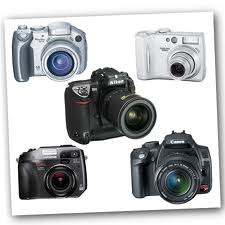
The best buy digital camera is not necessarily the cheapest, but the one that has the best overall package for your needs. It is important to check on the various functions and accessories before you compare prices to ensure that you find the best buy digital camera. The main reason that people want to buy a digital camera is for convenience rather than using a traditional film camera and there are a lot of best buy digital camera deals available.
The first point is to find the best buy digital camera with the highest resolution you can afford which will normally be at least 2 to 3 megapixels (2 million to 3 million pixels). If you will only output pictures to a computer monitor (for viewing, Web page use or e-mail) then the best buy digital camera will be one with a 640-by 480 pixel resolution and it will provide very satisfactory results. There are very few genuine best buy digital camera packages with high-resolution and the specified resolution may only apply to software interpolation rather than the true optical resolution. To print photographs on a good (at least 720 dots per inch) color printer you will need to look for the best buy digital camera with a high resolution.
Many retailers advertise their best buy digital camera as one with a plastic lens. It is better to buy a digital camera with a 100% glass lens for the best pictures. You should also look for the best buy digital camera packages with the most RAM that you can afford. The more RAM the camera has means that it can store more pictures and does not require downloading or erasing them as often.
When you are evaluating the best buy digital camera offers you need to compare optical, as opposed to digital, zoom capabilities. This is one of the most frequently used features of most digital cameras and you need to be sure that you have the capability to take the type of close-up shots that you want to.
Another issue that needs to be considered is whether the best buy digital camera offer actually includes the accessories that you require. If you find that you are going to have to purchase additional cables and software to be able to connect your digital camera to your computer then it is not going to be the best buy digital camera that you thought it was.
Finally, ensure that you have accounted for any shipping costs before you make your final decision over which best buy digital camera you purchase. A lot of unscrupulous retailers will advertise a price for a best buy digital camera but then charge high shipping costs.
Subscribe to:
Posts (Atom)
